
View all products
GPU lab platform for education

MonoLab

AI and GPU labs, ready to use without installation

Use GPUs for exactly as long as your courses and research need, and cut costs for the time they sit idle.

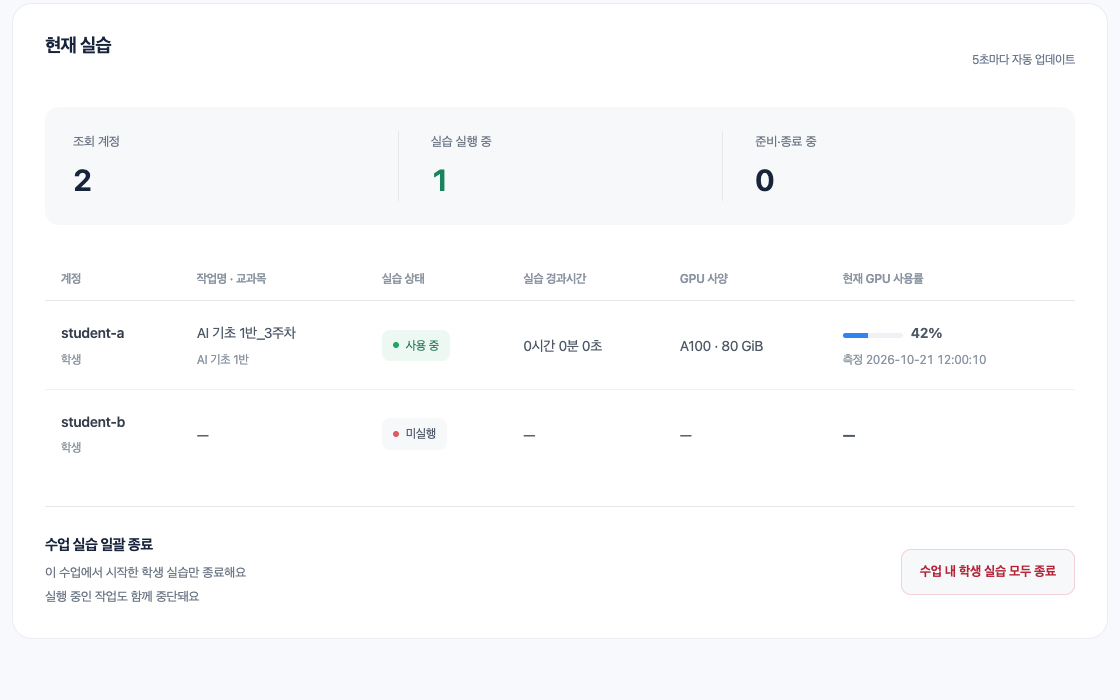
MonoLab current lab screen showing the number of accounts and running sessions, with each student’s session status and current GPU utilization in a table.
For
UniversitiesEducation
Core capabilities
  • Jupyter-based GPU labs
  • Hourly GPU usage
  • Automatic shutdown when idle
  • Unified management by course and lab

GPU labs that open right in the browser

With no installation or complex setup, signing in launches a Jupyter-based GPU lab prepared for each account. Files in personal storage remain after each session ends.

  • Browser-based JupyterLab
  • Per-account lab workspace
  • Persistent personal storage
Lab workspace — run GPU exercises in JupyterLab from the browser.

Unified GPU management by course and lab

Set up your institution as an organization and each course or research lab as a class to run separate GPU environments, with viewing and management scopes set by role.

  • Organizations and classes
  • Student, instructor, and admin roles
  • Course-wide session shutdown
Lab status — check session status and GPU utilization for students in your course.

Usage and costs in one view

See everything from current sessions and GPU utilization to usage by period, course, and user in one place, then export it for cost management and reporting.

  • Current lab status
  • Usage records by period
  • XLSX and CSV export
Usage records — review sessions by period and course, then export to Excel or CSV.

Personal storage management

Check how much persistent storage each account uses, clean up files you no longer need, and continue your lab work.

  • Storage usage at a glance
  • Early usage warnings
  • Download and clean up files
Storage cleanup — check usage and remove files you no longer need.

Lower costs with hourly use and automatic shutdown

Use GPUs for as long as your courses and research need, and automatically end idle sessions to cut unnecessary runtime and rental costs.

  • Time allocation and remaining balance
  • Automatic shutdown with advance notice
  • Unused time returned
Session time — choose time within your remaining balance and see when a session ends automatically.

Adoption and operations

From planning to operations

We agree on courses and the lab environment, then move on to account setup and ongoing support.

  1. 01Courses, rosters, and roles
  2. 02GPU specs and runtime environment
  3. 03Time allocation and account setup
  4. 04Operational support and usage records
Adoption inquiry

Considering a GPU lab environment for your courses?

Tell us about your courses and research labs, required GPU specs, and expected usage, and we will plan operations together.